GolfTracker Is Now on Apple Watch and Wear OS: Free Golf GPS Yardage and Shot Tracking
Yes, GolfTracker now has a free Apple Watch app. It shows the yardage to the front, middle and back of the green, lets you pick a club and mark each shot so your drive and club distances are measured, and keeps your score and putts on your wrist while your phone stays in the bag. It arrived with GolfTracker 1.0.18 on the App Store on October 4, 2026, and it comes with the iPhone app at no cost. Android golfers get the same on Wear OS watches through Google Play. Yardage shows on holes whose green has been mapped in GolfTracker; scoring and shot tracking work on every hole of every course.
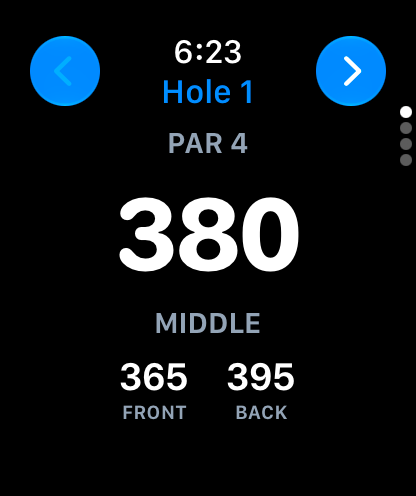
This post covers what the watch app does, how to set it up, how it compares with a laser rangefinder, and the questions golfers ask most. The short version lives on our golf GPS app for Apple Watch page.
What does the GolfTracker Apple Watch app do?
The watch app does the four jobs you want on the course without reaching for your phone:
- Yardage to the green. Front, middle and back, from where you are standing, updating as you walk up the fairway. The middle number is shown big enough to read at a glance.
- Shot tracking. Pick the club with the yardage in view, tap Mark, and the watch records where you hit from. The distance is measured when you mark your next shot or tap On the green.
- Score and putts. Two taps a hole. Saved on the watch even when you have no signal.
- Optional hole stats. Turn on Hole stats and the watch adds a page for fairway hit, green in regulation and penalties. Leave it off and the watch stays as short as possible.
Everything you enter on the watch lands on the same round as your phone. Score a hole on the watch and the next one on the phone, and each picks up what the other entered.
How does yardage work on the watch?
When you raise your wrist on a hole, the first screen is the yardage: the distance to the middle of the green in large type, with the front and back underneath. It is measured from your position with the watch's GPS, so the number changes as you walk.
Yardage needs the green to be mapped in GolfTracker. On a hole whose green has been mapped, you get front, middle and back. On a hole that has not been mapped yet, the watch still keeps your score, putts and shot marks; it just has no green to measure to. GolfTracker's start screen tells you how many holes on your course have yardage before you tee off, so you know what to expect.
How do you track shots and club distances on Apple Watch?
Shot tracking on the watch is built around one idea: you choose the club with the number in front of you.
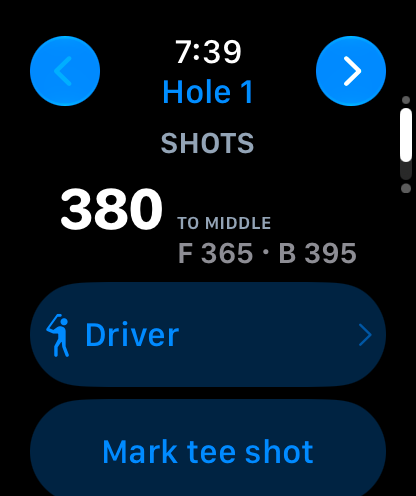
On the tee
On a par 4 or par 5, Driver is already picked for your tee shot. Tap Mark tee shot and hit. If you are taking a 3 wood or an iron instead, tap the club and choose another one first.
At your ball
Walk to your ball, tap Pick club, and choose from your clubs. The yardage to the green stays at the top of the list while you choose, so you are picking off the number, the same way you would with a caddie.
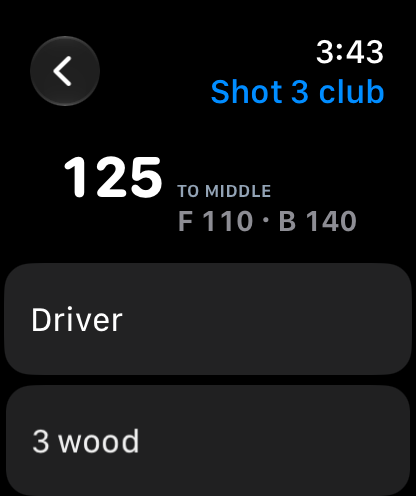
When the shot is measured
Marking your second shot measures your drive. Marking your third measures your second. When you reach the green, tap On the green and the approach is measured and the hole's shots are closed. Putts stay on the putts counter.
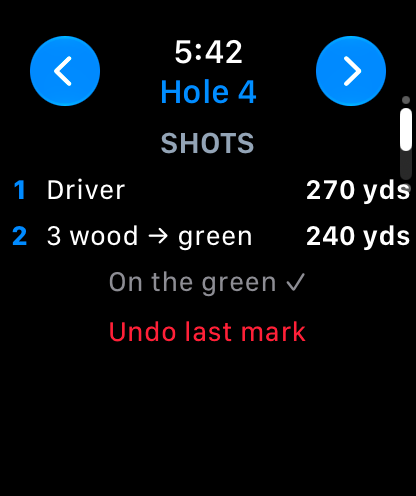
Mis-tapped? Undo last mark removes it. Over a few rounds your average drive and a distance for every club build up in your stats, which is the number that actually helps you choose a club.
How do you keep score on the watch?
Swipe to the score page, set your strokes with the minus and plus buttons, then your putts. That is the whole hole.
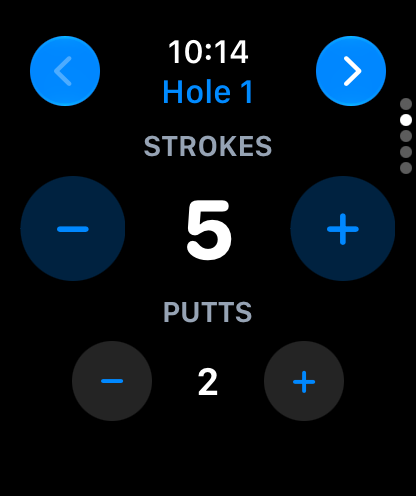
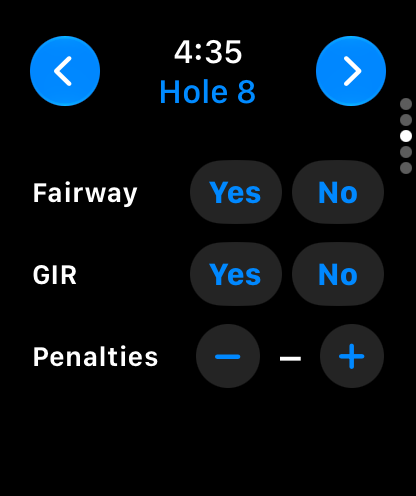
If you want more than a score, turn on Hole stats on the watch's round page. It adds a page for fairway hit (Yes or No, marked n/a on par 3s), green in regulation (Yes or No) and penalties. All of it is optional on every hole, and it matches the putts, fairway and GIR tracking already in the phone app.
Scores and shot marks made without a signal are kept on the watch and sent when it reconnects. When the round is over, you finish and post it in GolfTracker on your iPhone, and it joins your round history and stats. To see what the phone side does, including the shared leaderboard for your group, read about the free golf scoring app.
How do you set up GolfTracker on Apple Watch?
You need an iPhone with the GolfTracker app and an Apple Watch on watchOS 10 or later. The watch app is part of the iPhone app, so there is nothing extra to buy.
Step 1: Install GolfTracker on your iPhone
Download GolfTracker from the App Store. If the watch app does not appear on your watch automatically, open the Watch app on your iPhone and install GolfTracker from the list of available apps.
Step 2: Sign in on your iPhone
Open GolfTracker on your iPhone and go to My Golf. Your first sign-in uses your email address: enter it and tap the link we send. Your watch signs in through your phone, so there is no typing on your wrist.
Step 3: Start a round on your iPhone
Pick the course and start the round on your phone. If you want shot distances on the phone as well, turn on Track shot distances.
Step 4: Tap Start round on the watch
Open GolfTracker on your watch. It shows your course and how many holes have yardage. Tap Start round and put the phone in your bag.
Step 5: Allow Apple Health (optional)
The first time, the watch asks to save your round to Apple Health as a Golf workout. Allowing it is what keeps the watch's GPS running while your wrist is down, so the yardage is current the moment you look. GolfTracker only writes that workout. It never reads your Health data, and nothing from Health leaves your devices.
Step 6: Finish the round on your iPhone
After the 18th, finish and post the round in GolfTracker on your phone. Your scores, putts and shot distances are all there.
Forgot to close it out? The watch notices. If you leave the course (more than about two miles from every mapped green for 15 minutes) or go 90 minutes without scoring or marking anything, it ends the Golf workout and turns off GPS by itself, so it never keeps running in the background on the drive home. Your round stays open on your phone, and Start round on the watch picks it back up.
Is a GPS watch app as good as a rangefinder?
They answer different questions, and plenty of golfers carry both.
A laser rangefinder measures the exact distance to whatever you point it at, usually the flag. It is the most precise way to get a number to the pin, it does not need the course to be mapped, and it does not need a signal. It does not keep score, track your shots or tell you how far you hit each club.
GolfTracker on Apple Watch gives you GPS distances to the front, middle and back of the green from where you stand. You do not have to aim at anything, it works on blind shots where you cannot see the flag, and it is already on your wrist. Its numbers are to the green rather than to the pin, they depend on a GPS fix, and they need the green to be mapped. In return it also keeps your score, measures every shot you mark, and builds your club distances over time.
In practice:
- Choose a rangefinder if you want the exact number to the flag on every approach.
- Choose the watch if you want front, middle and back at a glance, plus your score and real club distances, without carrying another device.
- Use both if you like a pin number on approach shots and want everything else logged automatically.
Is the GolfTracker Apple Watch app free?
Yes. GolfTracker is free for golfers on iPhone, Apple Watch, Android and Wear OS, with no paid golfer tier. It is paid for by the clubs and charities that run their tournaments on GolfTracker. See what is in the free app on our free golf score tracker page.
Is GolfTracker on Wear OS and Android watches too?
Yes. GolfTracker is also on Wear OS watches such as the Samsung Galaxy Watch and Google Pixel Watch, through the same GolfTracker app on Google Play. It runs on Wear OS 3 and later. The watch app does the same jobs as on Apple Watch: front, middle and back yardage to mapped greens, score and putts, optional fairway, green-in-regulation and penalties, and shot tracking with your club choice. Your Android phone signs the watch in for you, and scores sync to the round on your phone.
One difference to know: on Wear OS the watch reads GPS while the GolfTracker app is open (including in always-on mode), rather than running a workout in the background. It also stops on its own if you leave the course or go 90 minutes without scoring.
Frequently asked questions
Does GolfTracker work on Apple Watch?
Yes. The GolfTracker Apple Watch app shows front, middle and back yardage to the green, keeps your score and putts, and marks each shot so you see how far it went. It comes with the iPhone app and signs in through it.
Can I leave my phone in the bag?
Yes. Start the round on your iPhone, tap Start round on the watch, and put the phone away. Yardage, scores and shot marks all work from the watch, and anything entered without a signal is sent when the watch reconnects.
Does the watch show yardage on every course?
Yardage shows on holes whose green has been mapped in GolfTracker, and not every course is mapped yet. Scoring, putts and shot marks work on every hole of every course, mapped or not. Browse courses in the GolfTracker course directory.
Does it give the distance to the pin?
No. GolfTracker shows GPS distances to the front, middle and back of the green, not to the flag on the day. For an exact pin distance, a laser rangefinder is the right tool.
Can I use my phone and my watch on the same round?
Yes. It is one round in one account. Score a hole on your watch and the next on your phone; each picks up what the other entered, and your shot marks show on both.
Do I need Apple Health?
No, but it helps. Allowing the Golf workout keeps the watch's GPS on while your wrist is down, so the yardage is ready when you look. GolfTracker only writes the workout and never reads your Health data.
Will the watch app keep running after my round?
No. If you forget to end the round, the watch stops its Golf workout and GPS on its own once you are about two miles from the course for 15 minutes, or after 90 minutes with nothing scored. The round stays open on your phone to finish later.
Which Apple Watch do I need?
An Apple Watch running watchOS 10 or later, paired with an iPhone that has GolfTracker installed.
Is there a GolfTracker app for Android watches?
Yes. GolfTracker runs on Wear OS 3 and later, including Samsung Galaxy Watch and Google Pixel Watch. Install it from Google Play on the watch, sign in on your Android phone, and the watch signs itself in.
Get it on your wrist
Download GolfTracker for iPhone and Apple Watch or get it on Google Play for Android and Wear OS, sign in with your email, and your next round has yardage, shot distances and a scorecard on your wrist. Playing with friends? GolfTracker keeps everyone's card on one live leaderboard, and Bogey, the AI caddie, settles the skins and the Nassau in the phone app.